
Find your way around
A short tour, so you know where to look before you need to.
The dashboard
The first thing you see after signing in. Nothing here needs configuring — it is a read-out of what your account is doing.
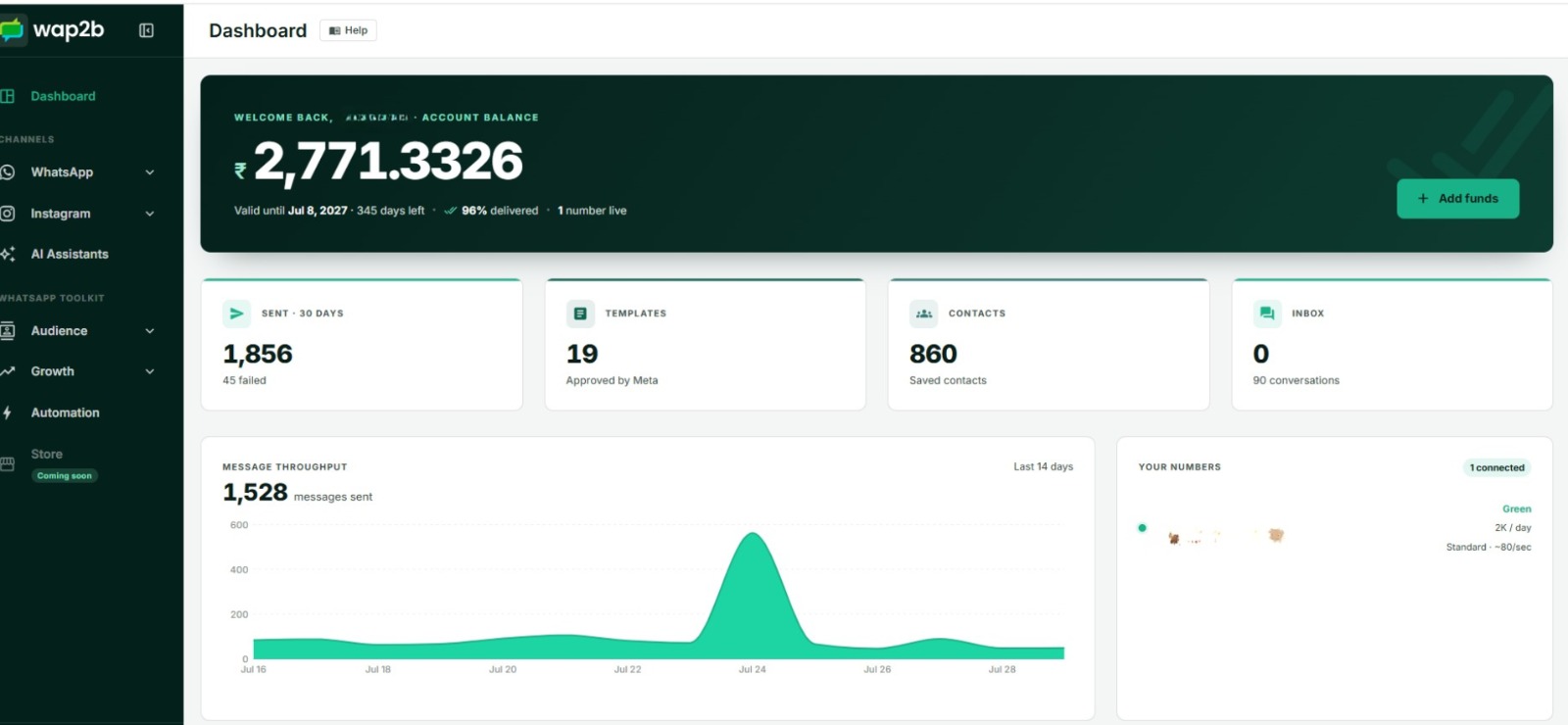
The four tiles across the top adapt to the channels you actually use:
| Tile | What it counts |
|---|---|
| Sent · 30 days | WhatsApp messages sent in the last 30 days, with failures called out beneath if there were any |
| Templates | How many of your templates Meta has approved and you can therefore send |
| Contacts | Everyone saved in your contact list |
| Inbox | Unread messages, with your total conversation count beneath |
Below the tiles:
- Balance and delivery rate — how much credit is left, and what share of recent sends actually reached someone.
- Throughput, last 14 days — a bar per day, so a drop is obvious at a glance.
- Spend breakdown — where the money went, split by marketing, utility, authentication, incoming messages, AI replies and failed-send fees.
- Number health — each connected number and whether it is in good standing.
- Recent broadcasts and recent conversations — jump straight back into either.
The left menu
Organised by channel first, then by toolkit. The idea is that "manage my WhatsApp" is one place rather than eight scattered links.
Channels
- WhatsApp — Phone numbers, Chatbox, Single message, Broadcasts, Sent messages, Message logs, Templates, Flows, Media and Analytics.
- Instagram — if you connect an Instagram account, its inbox, comments and content live in their own group.
AI assistants — one hub for every assistant, across both channels.
WhatsApp toolkit
- Audience — Contacts, Groups, Subgroups.
- Growth — click-to-chat Links, QR codes, Website widget, Opt-in pages.
- Automation — ice-breakers, commands and the welcome message on your number.
- Store — catalogs. Marked Coming soon; not available yet.
Seeing fewer items than this?
If you were invited to someone else's account as an Agent, the menu is trimmed to messaging and contacts on purpose — no billing, no analytics, no settings. See Work as a team.
The account panel
Click your name in the top corner. Everything about your account rather than your messaging lives here, which is why you will not find it in the left menu:
| Item | For |
|---|---|
| Update Profile | Your name, contact details and preferences |
| API keys | Keys for the REST API |
| Developers | The full API reference |
| Integrations | Connecting your other tools, and outbound webhooks |
| Recharges | Adding funds |
| Wallet | Balance and full transaction history |
| Orders | Past payments, invoices and receipts |
| Pricing | Per-message rates |
| Team | Inviting and managing people |
| Tickets | Raising and tracking support requests |
Two logs, and which is which
This pairing confuses people, so it is worth being blunt:
- Sent messages — everything you sent out: broadcast recipients and single messages. Filter by type to see one or the other.
- Message logs — every message on the account, however it was sent: chatbox, broadcast, API or automation, inbound replies included, each with its cost.
Full explanation in Find any message you've sent.
Next
Words you'll see in this manual — worth a skim before you go further.