
Write your first instant reply
An instant reply is a question you have answered a hundred times, written down once. Every message a customer sends your WhatsApp number is checked against your list of answers, and the first one whose words match is sent back — word for word, in under a second, whether or not anyone is at the keyboard.
There is no AI here and nothing to train. You write the reply; that exact reply is what goes out.
Answers are set per number
Instant Replies works on WhatsApp numbers, and each number keeps its own list. If you have two numbers, a sales one and a support one, they answer differently and neither sees the other's answers.
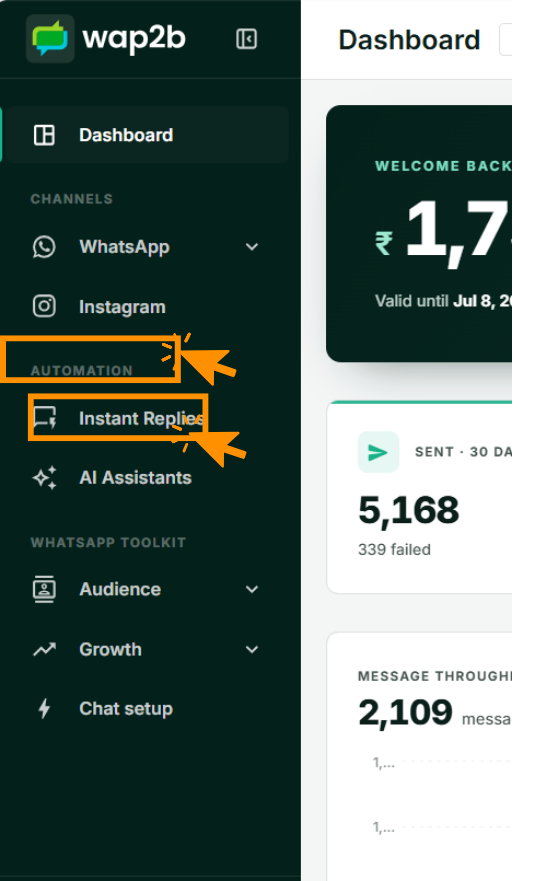
Open Instant Replies
In the sidebar, under Automation.
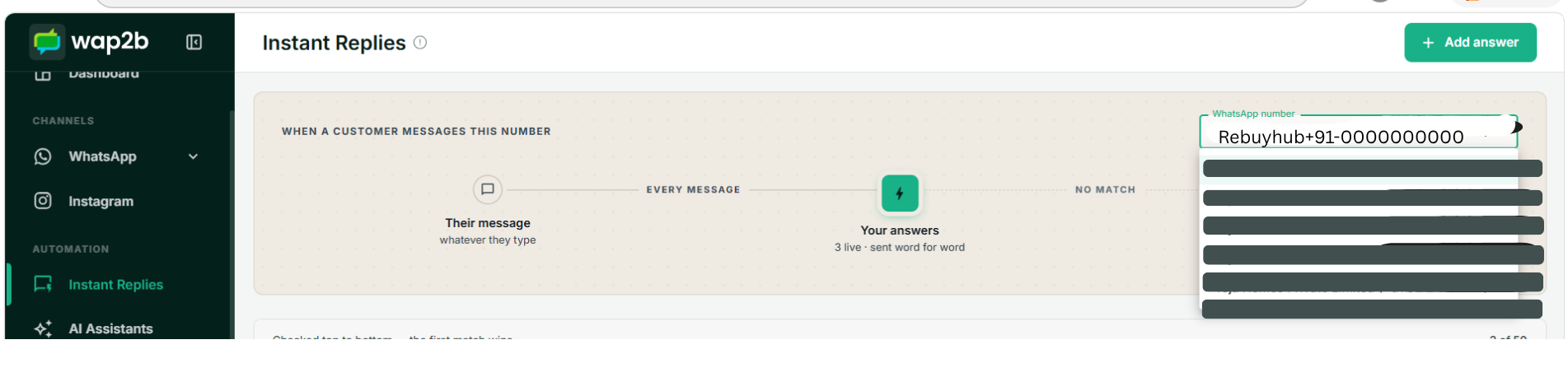
Pick the number
The picker at the top right of the page chooses which of your WhatsApp numbers you are editing. Everything below it — the list, the answers, the counts — belongs to that number alone.
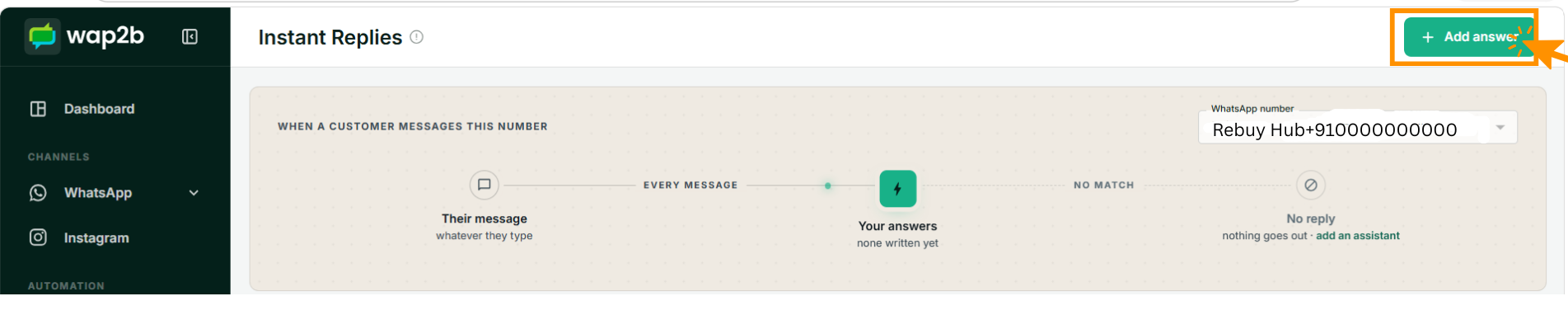
The strip along the top
Above the list is a small diagram of what happens to an incoming message. It is worth reading once, because it is the whole feature in one line:
- Their message — whatever the customer types, on every message they send, not just the first.
- Your answers — checked in order. It tells you how many are live.
- No match — what happens to a question none of your answers catch. With no AI Assistant on this number it says No reply: nothing goes out and the message simply waits in your inbox. With an assistant active, it names the assistant instead, and the assistant takes over from there.
Write the answer
Click + Add answer.
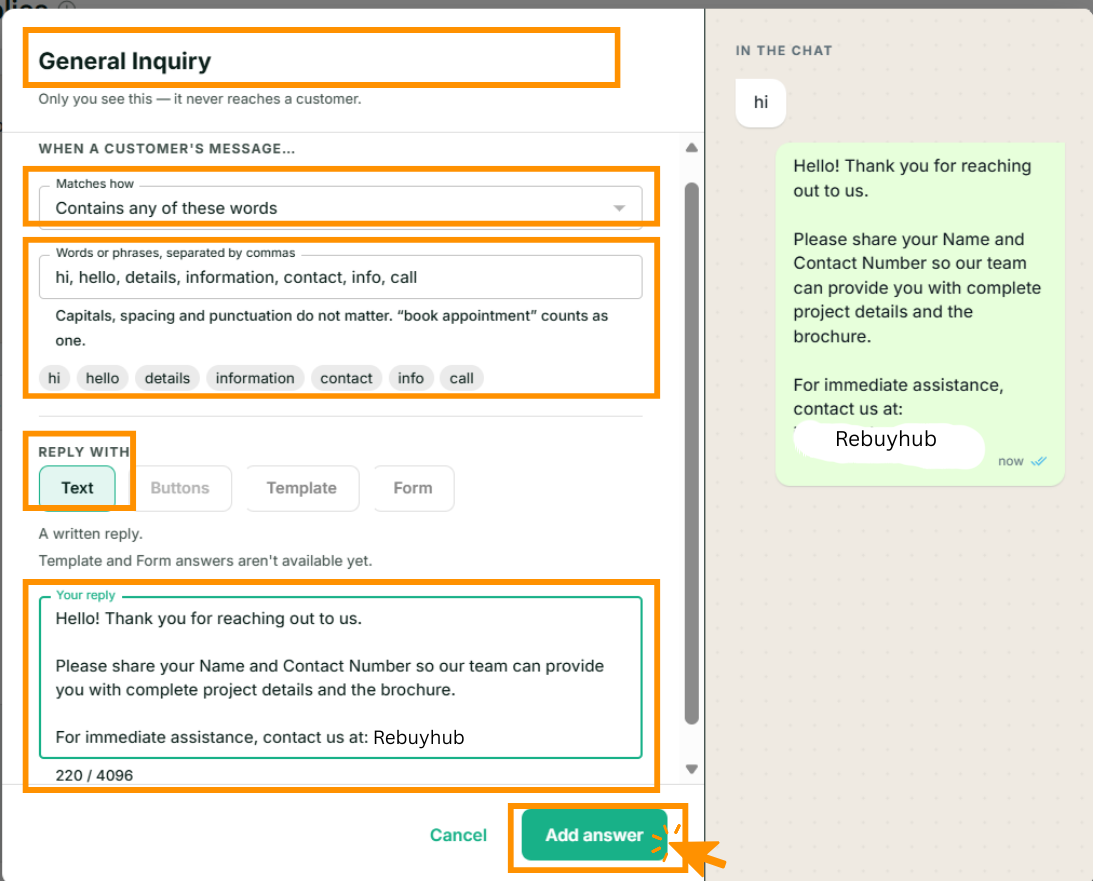
There are four things to fill in.
1. A name. General Inquiry, Opening hours, Delivery charges. This is a label for you — it never reaches a customer, and it is what you will scan when the list gets long. Up to 60 characters.
2. Matches how. How the customer's words are compared with yours:
| Option | Fires when |
|---|---|
| Contains any of these words | The message contains any one of your words or phrases anywhere in it. The usual choice. |
| Is exactly one of these | The whole message is nothing but one of your words. Strict, and useful for a one-word menu code. |
| Is a tap on one of these buttons | The customer tapped a button rather than typing. See button menus. |
| Opens the chat from one of these ads | The chat was opened by clicking one of your Click-to-WhatsApp ads. The words here are ad ids from Ads Manager, not language. |
| Is anything at all | Every message. A catch-all — offered only when this number has no AI Assistant, because a catch-all would leave the assistant nothing to answer. |
3. The words. A comma-separated list — up to 20 per answer. They appear as chips underneath as you type, which is how you check the list split the way you meant it.
Capitals, spacing, accents, emoji and punctuation are all ignored on both sides, so Price?,
price and PRICE are the same word. A phrase counts as one entry: book appointment matches
only when both words appear together in that order.
Whole words, not fragments
hi will not fire on this or ship. Matching is by whole word or whole phrase, so short
keywords are safe to use.
4. The reply. Leave Reply with on Text for a written reply, and type it in the box. Up to 4,096 characters, and line breaks are kept exactly as you type them. Template and Form answers are greyed out — they are not available yet.
Click Add answer and it goes live immediately. There is nothing to publish.
Add a second, narrower answer
One answer is rarely enough. The pattern that works is a broad greeting answer plus a handful of narrow ones for the questions you are actually tired of typing.
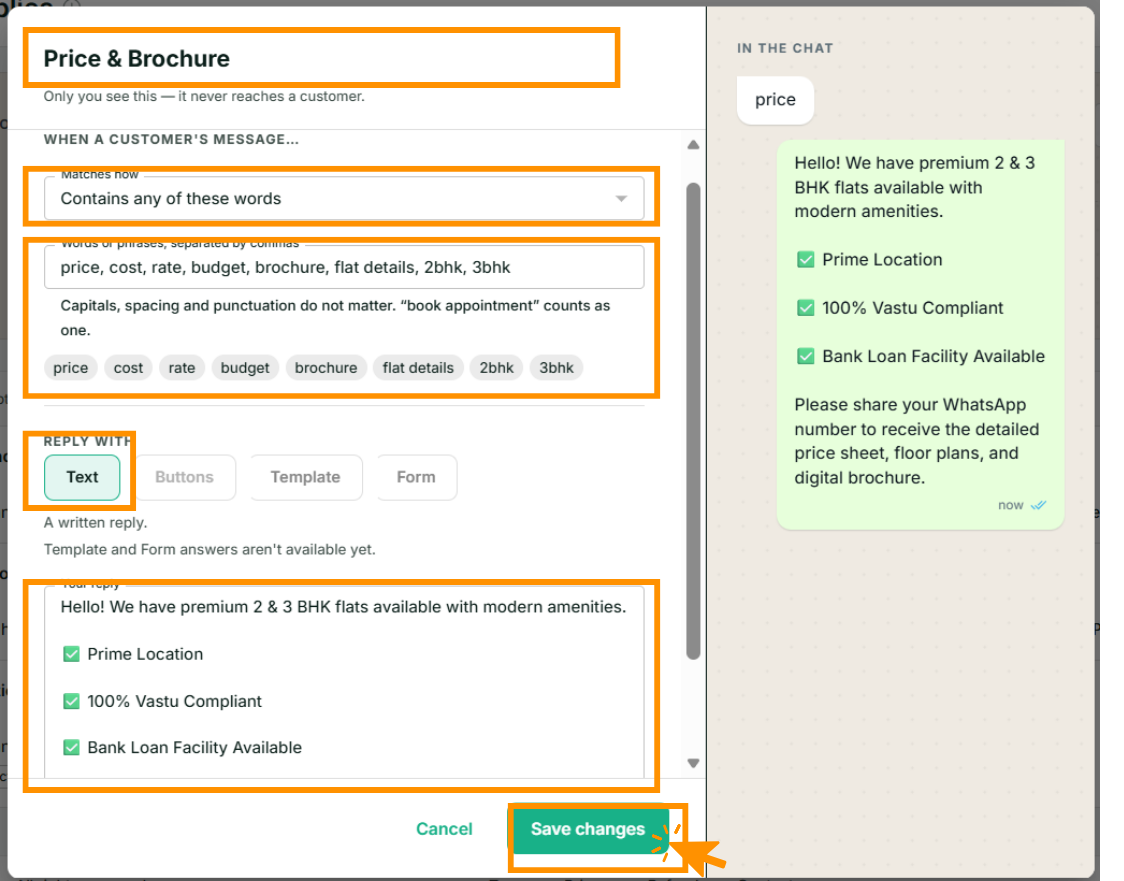
Notice the words on this one: price, cost, rate, budget, brochure, flat details, 2bhk, 3bhk.
They are the words customers use, including the shorthand, not the words you would use in a
brochure. That is most of the skill in writing these.
Getting it right
- Start with three. Your opening hours, your prices, and where you are. The empty page offers those three as one-click starters for exactly that reason.
- Use the customer's words, not yours.
how much, notpricing enquiry. Add the misspellings and the shorthand you genuinely receive. - Keep the reply short and end with a way forward. A good instant reply answers the question and asks for the one thing you need next — a name, an area, a number.
- Do not try to build a conversation out of them. These are answers, not a script. Every
message is judged on its own words with no memory of the last one, so an answer that says
"reply 1 or 2" only works if
1and2are themselves answers. When you find yourself wanting the fifth follow-up, that is an AI Assistant, not a longer list.
What it costs
An instant reply is an automated message, and it is charged at the automated-reply rate — the same rate as an away reply, per reply sent. Replies you type yourself in the inbox stay free. See How pricing works for the rate in your currency.
Because the customer messaged you first, these always go out inside the 24-hour window, so there is no template and no approval involved.
Next
Reply with a menu of buttons — give people something to tap instead of asking them to type.