
Track what happened
Every message carries a status. Knowing what each one actually means saves a lot of guessing.
The statuses
| Status | What it means |
|---|---|
| Queued | Accepted by Wap2b, not yet handed to WhatsApp. Normal for a few seconds. |
| Sent | WhatsApp has it. One grey tick. |
| Delivered | It reached the recipient's phone. Two grey ticks. |
| Read | They opened it. Two blue ticks — but only if they have read receipts on, which many people do not. |
| Failed | It did not get through. There is always a reason. See A message failed. |
Delivered is the number that matters
Read undercounts, always. Anyone with read receipts turned off shows as delivered forever, even having read it twice. Judge a campaign on delivery rate and on replies, never on read rate.
Stuck on Sent for hours usually means the recipient's phone is off or offline. It will move to delivered when they reconnect.
Which log to open
Wap2b has two, and the difference is the whole point:
Sent messages — /broadcasts/log Recipients of broadcasts, and nothing else. Every recipient of every broadcast you have sent, with delivery status. Search by contact number, or filter by date, broadcast or template. Use it for "did this campaign reach that customer?"
Message logs — /message-logs Every message on the account, however it was sent — chatbox, broadcast, API or automation — inbound replies included, each with status and cost. Use it for "what happened with this customer?" and "where did the money go?"
If you want one campaign, use the broadcast log. If you want one person's whole history, use message logs. More detail in Find any message you've sent.
One broadcast in detail
Open a broadcast from Broadcasts and you get its own summary: how many sent, delivered, read and failed, and the per-recipient list with each status and any failure reason.
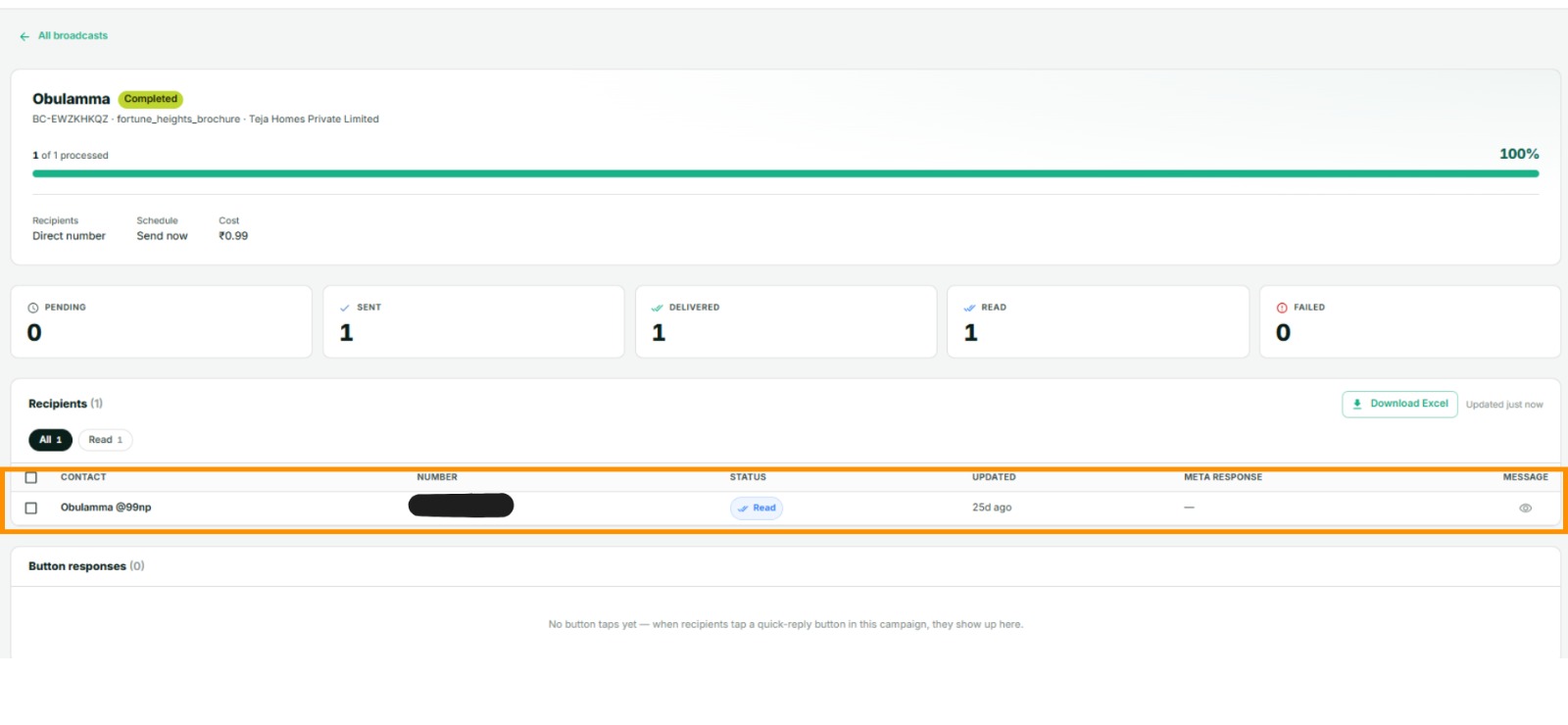
That per-recipient view is the one to use when a customer says they did not receive something. Search their number and you have the answer.
Reading the result
- Delivery rate below about 90% means a list problem — old numbers, wrong formats, people who never had WhatsApp on that number. Clean it before sending again.
- A sudden drop across a send that used to work points at the number's standing. See My number or account is restricted.
- Good delivery, no replies means the message, not the plumbing. It arrived; it did not land.
- Replies coming in — answer them in Chatbox. Those conversations are open for 24 hours and your replies inside them are free.
If something goes wrong
- Everything says queued. Sends are backing up. Give it a few minutes; if it persists, open a ticket.
- A customer insists they got nothing, but the log says delivered. It reached the device. Ask them to check archived chats and their block list.
- Failures with no obvious pattern. Export from message logs and sort by failure reason — the pattern is usually in the numbers themselves.
Next
Reply to customers — the replies are the point of the broadcast.